Business Travel Automation for Lower Costs and Smoother Workflows
By Dominic Marc Short · 26 October 2026 · 14 min read

Automation works best when it removes administrative work, not human judgement. Connecting bookings, approvals and expense tracking can reduce repetitive steps while keeping people involved in decisions that need context. In practice, optimizing business travel workflows means making the journey from request to reimbursement clearer, more consistent and easier for travellers.
It’s understandable to focus first on cost and speed: nobody wants booking a trip to feel like a small expedition. But a smoother system also depends on employee trust, clear guidance and tools that support travellers rather than adding another layer of rules. This article explains how business travel automation can affect costs, operational efficiency, policy compliance, approvals and the traveller experience. You’ll also find practical steps for improving the workflow without automating every decision at once.
Table of Contents
- 1. What is business travel automation and how does it work?
- 2. Automation’s impact on travel costs and operational efficiency
- 3. Travel policy compliance and approval workflows
- 4. Employee trust, training and traveller experience
- 5. What are the key steps in an efficient business travel workflow?
- Dominic Marc Short - Independent Consultant: Business Travel Management Consulting
1. What is business travel automation and how does it work?
Business travel automation connects steps that employees and administrators might otherwise handle separately. A booking can trigger an approval, create an itinerary, send confirmations and pass expense details into reporting. The goal is a coherent process from travel request to reconciliation, not simply a faster way to book flights.
Start with the booking flow. An employee enters a destination, dates, trip purpose and cost centre; the system applies company rules and displays approved options. Once a booking is authorised, confirmations and itinerary details can be sent to the traveller, while relevant records flow to finance. If a flight changes, an integrated system can update the itinerary and notify the traveller, instead of leaving them to search through old emails.
Expense automation continues the process after travel. For example, a traveller submits a receipt for a trip, and the system matches it to the booking record for review. A payment can follow an approved expense or supplier invoice, subject to the organisation’s controls. Clear exception handling still matters: a missing receipt or changed booking may require human judgement.
Integrations connect the travel platform with tools the business already uses. If a booking system offers a suitable travel API, an open-source integration layer can pass selected data between systems. Booking references, dates, traveller details and cost centres can then sync with a CRM or finance database. Define which system owns each field and set error alerts first; otherwise, duplicate records can spread as efficiently as correct ones.
Centralisation brings approved travel products and bookings into one view. It helps teams apply consistent processes to flights, accommodation and related expenses, while keeping confirmations linked to the relevant trip. Automation works best when every step has a clear owner, a defined approval rule and a way to handle exceptions.
Which corporate travel management platforms are best for Swiss businesses? There is no single best platform for every organisation. Compare Swiss-franc reporting, policy controls, approval routing, expense handling and integration with your existing finance and CRM systems.
How can businesses compare direct booking with a corporate travel agency? Compare the full workflow, including booking access, internal administration, policy oversight, support arrangements and total costs. Direct booking may give employees more control, while an agency can consolidate travel coordination. The right fit depends on your programme’s needs.
What are the Swiss VAT rules for business travel expenses and reimbursement? Keep reimbursement records separate from VAT accounting, and link each claimed expense to its business purpose and supporting invoice. VAT treatment depends on the expense and its documentation, so accurate classification is essential.
How do Swiss employers handle business travel time, working hours and expense reimbursement? Employers should specify how travel time is recorded and treated, which expenses can be reimbursed, and what evidence employees must submit. A written policy gives travellers and approvers a consistent process for handling each trip.
2. Automation’s impact on travel costs and operational efficiency
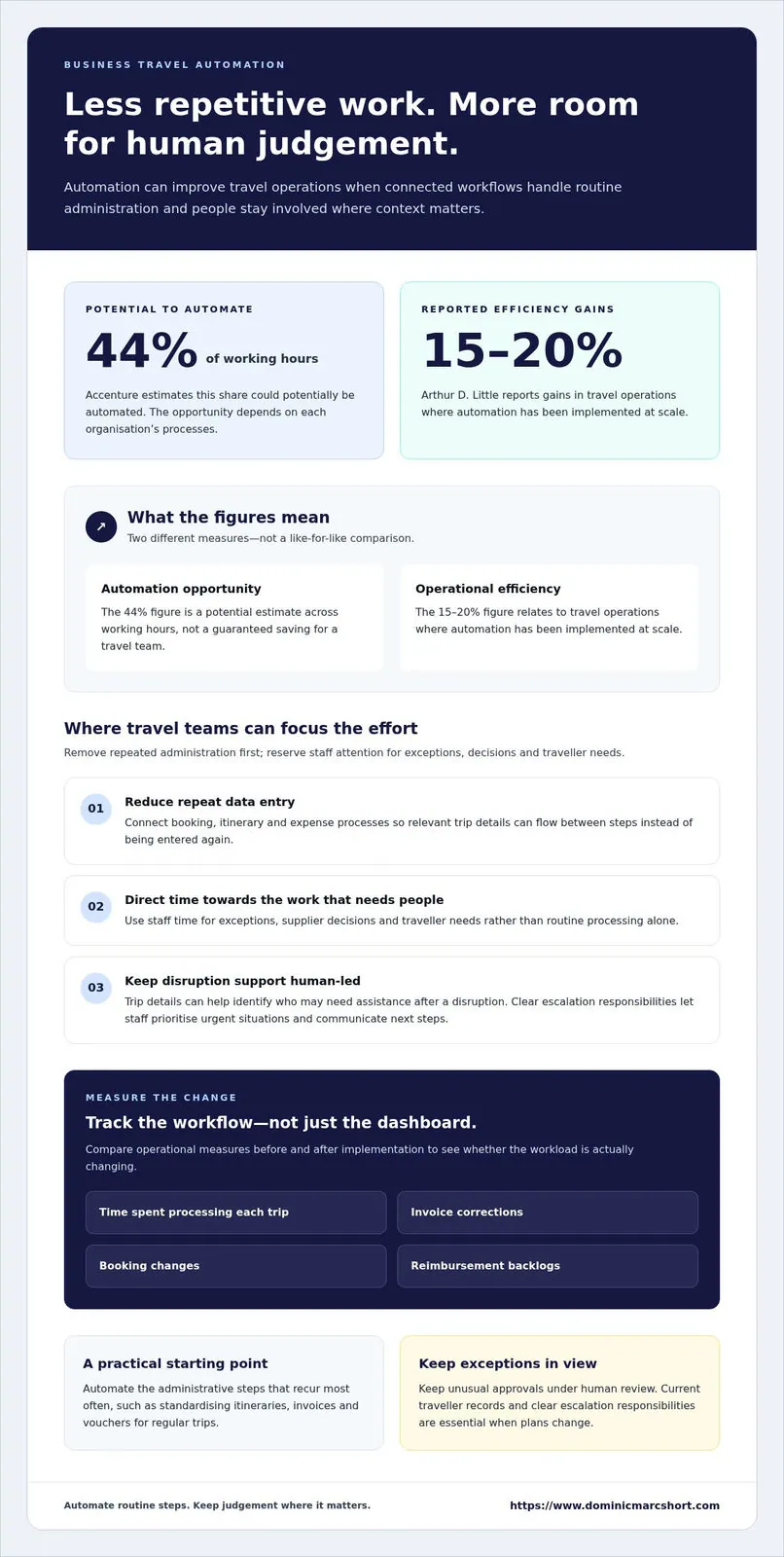
Automation can reduce the manual work surrounding a trip, from comparing options to processing invoices. Accenture estimates that 44% of working hours could potentially be automated, although the opportunity depends on each organisation’s processes. For travel teams, the practical gain comes from removing repeated data entry and directing staff time towards exceptions, supplier decisions and traveller needs.
Efficiency gains are most relevant when workflows connect instead of creating another administrative island. Arthur D. Little reports 15–20% efficiency gains in travel operations where automation has been implemented at scale. A business can assess progress by tracking indicators such as time spent processing each trip, invoice corrections, booking changes and reimbursement backlogs. Compare those measures before and after implementation; otherwise, a slick dashboard may look impressive while the workload remains stubbornly familiar.
Disruptions show why automation should support people, not replace judgement. If a flight cancellation affects a traveller’s itinerary, a duty-of-care process can use available trip details to identify who may need assistance and direct the case to the responsible team. Staff can then prioritise urgent situations and communicate next steps. Systems only help when traveller records are current and escalation responsibilities are clear.
For SMEs, consultants and non-profits, a useful strategy is to automate the administrative steps that recur most often. A small organisation might standardise the itinerary, invoice and voucher process for regular trips, while keeping unusual approvals under human review. Global teams may need consistent reporting across locations while accommodating local processes. The right balance depends on booking volume, existing systems and how much hands-on coordination each trip requires.
Tour operators can apply similar workflow thinking beyond corporate travel. An automated sequence, for example, can assemble an offer, generate an itinerary, issue booking confirmations and prepare an invoice or voucher after a reservation. A staff member can review exceptions, such as a changed departure date or special request, instead of checking every routine document. Clear error alerts matter: a failed payment should not leave a confirmed booking without its next required action.
What are the costs and pricing models of business travel management software in Switzerland? Pricing may be structured as a subscription, a per-user charge or a transaction-based fee; compare what each model includes. Costs depend on the platform, booking volume, integrations and implementation scope. The price is provided after a quote request.
3. Travel policy compliance and approval workflows
A useful approval workflow turns travel policy into clear decisions and actions. Begin by defining which trips need approval, who reviews them and what information each request must include. For example, employees could submit the destination, trip purpose, project code and estimated spend together. A complete request gives approvers context without requiring a follow-up email for missing details.
Set policy rules around factors that genuinely affect a trip. These may include employee role, location, trip purpose, flight class and hotel budget. A platform can automatically approve requests that meet the rules and flag exceptions for review. If a hotel exceeds the relevant limit, the request can go to a manager authorised to approve that spend. Clear thresholds help employees understand the process before booking.
Approval controls should reflect the trip’s cost and purpose. A low-cost local journey might follow a streamlined route, while an expensive international trip could require additional review. Companies can assign approvers by trip type or cost instead of sending every request through the same queue. They can also set up multiple approvers when finance, a line manager or a project lead each has a distinct decision to make.
Project-based approvals connect travel decisions to the work being funded. Ask employees to select a project or client code when requesting a trip, then route the request to the relevant budget owner. For example, a consultant travelling for a specific engagement may need project approval before booking. This makes costs easier to allocate and helps project leads see planned travel before invoices arrive.
Keep approval rules understandable. A policy that tries to cover every unusual case can become harder to follow than the booking process it was meant to improve. Document the standard route, common exceptions and the person responsible for each decision. Make the policy easy for employees to find, and explain what happens when plans change after approval.
Monitoring reveals where a process needs adjustment. Review approval delays, rejected requests, policy exceptions and employee feedback. If requests regularly wait for one approver, revise the routing or assign another authorised reviewer. If the same exception keeps appearing, examine whether the policy limit or booking guidance still fits the organisation’s travel patterns. Research and trip records can help distinguish a genuine policy gap from an avoidable data-entry error.
Before applying a workflow across the business, test it with realistic examples. Try a routine local trip, a high-cost booking and a project-funded journey. Confirm that each request reaches the right approver, captures the required details and records the decision. This makes compliance part of the travel process, rather than a surprise waiting in an expense report.
4. Employee trust, training and traveller experience
Automation earns employee trust when it makes a real task easier, not merely more digital. A traveller should be able to find an approved option, understand why it fits policy and access the itinerary without learning a complicated new system. Business travellers value practical support: 83% trust AI and automated tools to assist with itinerary planning. That confidence depends on useful results and clear boundaries.
Explain what the software does before employees use it. A short demonstration can show how to book a trip, update traveller details, submit a receipt and request help with an exception. Use a realistic example, such as changing a meeting location and checking the revised itinerary. Employees should also know which decisions remain with a manager, so automation doesn’t feel like an invisible rule-maker.
Match training to each employee’s role. Travellers need concise booking and expense guidance; approvers need to understand policy flags and exception routes; finance teams need consistent records for review. A one-page guide, a short screen recording and a named internal contact can make first use less daunting. Keep instructions aligned with the current process, because outdated screenshots are an efficient way to create confusion.
Design the experience around common points of friction. If employees must enter the same trip details into separate forms, the workflow hasn’t eliminated much manual work. Connect booking records to expense steps where possible, explain required fields beside the form and show what happens after submission. Faster approvals and clearer status updates help travellers plan without chasing several inboxes.
Trust also depends on how an organisation handles mistakes and unusual needs. Give employees a clear way to correct traveller details, report an itinerary problem or request human review. For example, if a system recommends an option that doesn’t fit a traveller’s schedule, they should know how to raise the issue. A clear route for corrections turns feedback into useful insight rather than another support ticket lost in the digital wilderness.
Measure the experience alongside budgets and processing time. Track repeated support questions, incomplete expense submissions and feedback after trips. One survey finding reports that 45% of business travellers feel automation tools improve their personal travel experience. Use that figure as a reason to ask employees what helps or frustrates them, not as a substitute for listening to your own travellers.
Introduce changes in manageable stages. Demonstrate the workflow to a small employee group, gather feedback and adjust confusing instructions before a wider rollout. Explain what has changed, where to find help and how feedback will be used. When employees understand the purpose behind a new step, automation becomes part of a sensible travel routine, not another surprise on the way to the airport.
5. What are the key steps in an efficient business travel workflow?
Begin by defining the purpose of each trip and the decision it supports. A client visit, project workshop and internal planning meeting each call for different outcomes. A disciplined approach to optimizing business travel workflows starts by recording those objectives, so requests can be assessed against a genuine business need rather than habit. A clear purpose also helps teams decide when travel is the right option.
Next, map the process from request through post-trip review. Identify who provides the details, who makes each decision and where records are kept. For example, an employee might submit the destination, dates, purpose and project code through one form. Mapping each hand-off reveals duplicate data entry and shows where requests tend to stall. If nobody knows who owns the next step, even a tidy form can become an administrative mystery.
Make policy guidance easy to use during planning. Explain approved booking routes, budget responsibilities and what approvers need to make a decision. Keep instructions close to the travel process, rather than tucked away in a folder that takes an expedition to find. Practical examples help employees apply the rules without decoding a policy document like a puzzle.
Route each request to the appropriate budget owner before booking. An employee travelling for a client project, for instance, may need the project lead to confirm the purpose and cost allocation. Set out how exceptions are handled, including who reviews a changed plan or a request outside the usual policy. This way, travellers aren’t left guessing whether an earlier decision still applies.
After approval, give employees access to suitable booking options within the organisation’s rules. Keep confirmations and itinerary details linked to the trip record, and explain how to report changes. If a meeting moves, employees should know whether to update the booking, notify an approver or both. A clear process helps prevent conflicting versions of plans.
Once the trip ends, connect expense records to the original request. Ask employees to identify the relevant project or department and provide the supporting documents required by the organisation. Finance can then compare actual spend with the approved plan while trip details are still easy to find.
Finally, review how the process performed. Track where requests pause, which information is often missing and what travellers found unclear. For teams optimizing business travel workflows, these findings can guide one focused improvement at a time, such as clarifying a form field or changing an approval route. Revisit the process as responsibilities evolve, and give each step a clear owner.
Dominic Marc Short - Independent Consultant: Business Travel Management Consulting
Dominic Marc Short, Independent Consultant, helps organisations review and improve business travel processes through Business Travel Management Consulting. This can be a practical next step when disconnected systems, unclear approval routes or inconsistent travel data make the workflow difficult to manage.
The work can include process analysis, travel management solutions, payment processes and digital transformation. For organisations introducing new systems, Global Transformation Management and Change Management Communications Packages can support the wider transition and help employees understand what is changing.
Whether you’re refining an existing travel programme or planning a broader operational change, the focus is on aligning processes with your organisation’s needs. Contact Dominic Marc Short - Independent Consultant or visit www.dominicmarcshort.com to discuss your business travel requirements.
Make your next travel process change count
Choose one decision your travel programme should make better. That might mean improving visibility for budget owners, making traveller guidance easier to use or ensuring trip data supports wider planning. Define the intended change before adjusting systems, so every new setting serves a clear business purpose.
As your organisation evolves, revisit how people, policy and technology work together. A workflow that suits a small team may need different responsibilities as travel becomes more complex. Keep ownership clear, involve the people who use the process and treat their feedback as part of good management. That’s how optimizing business travel workflows becomes ongoing progress rather than a one-off technology project.
For support shaping the next stage of your travel programme, start a conversation.
Every well-considered improvement can make business travel easier to manage and more pleasant to undertake. Build on that progress one thoughtful decision at a time.
Frequently Asked Questions
What is business travel automation and how does it work?
Business travel automation uses connected digital tools to coordinate routine tasks around a work trip. For example, an approved booking can provide trip details to finance, while a change to the departure time prompts an itinerary update. The organisation defines which actions happen automatically and which require staff review. This keeps routine processing consistent while making exceptions, such as a missing receipt, visible to a person.
How much does automation save in staff time?
The staff time saved depends on the current process, trip volume and how often employees re-enter or correct information. Establish a baseline by recording time spent on tasks such as booking administration, expense review and invoice matching. After introducing automation, measure those same tasks over a comparable period. For instance, separate time spent resolving exceptions from routine processing to show where capacity has actually been released.
How can companies automate business travel booking, approval, and expense reporting?
Begin by mapping a complete trip, from the initial request through final expense review. Identify where employees enter the same information twice, then connect the relevant booking, approval and finance systems. Test a typical journey and an exception, such as a changed hotel date, before a broader rollout. Assign someone to monitor failed data transfers, so a technical error doesn’t quietly leave a booking or claim incomplete.
How should businesses set travel policies, budgets, and approval limits?
Set policy around business purpose, employee responsibilities and the organisation’s budget structure. Define who can approve routine trips, which circumstances require escalation and how project-funded travel is assigned. For example, a department manager might review ordinary team travel, while a project owner considers costs charged to a client engagement. Review employee feedback and approval patterns regularly, then adjust rules that cause repeated confusion or unnecessary delays.
What are the main risks in business travel, including duty of care, data privacy, and cancellations?
Key risks include losing track of a traveller during a disruption, exposing personal or booking data unnecessarily, and failing to act on cancellations or schedule changes. Keep trip records accessible to the people responsible for coordination, restrict access to relevant roles and establish a clear escalation route. For example, when a flight is cancelled, staff need to know who contacts the traveller and who updates internal plans. Keep traveller details current.
How can companies measure business travel workflow efficiency and travel spend?
Use a small set of consistent measures: time to approve requests, expense-processing time, policy exceptions, booking changes and spend by department or project. Compare actual expenditure with approved budgets and investigate recurring differences rather than relying on a single overall total. For example, frequent late changes may indicate planning friction, while repeated missing receipts may point to unclear expense instructions. Pair system data with traveller feedback to understand why patterns occur.
Related articles

21 October 2026 · 14 min read
Reducing Carbon Footprint from Business Travel: How to Measure and Lower Emissions
Ready to travel smarter? Discover jolly clever ways of reducing carbon footprint from business travel, measuring impact, and keeping journeys eco-friendly!
6 November 2026 · 15 min read
Virtual credit cards for business travel and spending controls
Explore how virtual credit cards for business travel control spending, simplify expenses and keep bookings moving with supplier checks and backup plans.

30 October 2026 · 14 min read
Improving employee travel experience with smoother work trips
Discover how improving employee travel experience with comfort, flexibility and simpler booking and expenses can support lasting satisfaction and retention.