Training Employees on a New Booking Tool: A Practical Checklist for 2026
By Dominic Marc Short · 7 October 2026 · 14 min read

A booking tool can be simple to click through and still feel tricky when a real travel decision comes up. The challenge of training employees on new booking tool workflows is not showing them where every button lives. It is helping them make confident choices when plans, preferences and company policy meet. A quick workaround may seem convenient, but it can lead to inconsistent bookings and leave travel managers guessing what went wrong.
Effective training starts with the situations employees actually face. They need to practise the booking journey, understand policy at the points where it matters and know what to do when a booking does not go to plan. No one needs a lecture on every menu before arranging a trip.
This practical checklist will help you prepare for launch, teach the workflow through realistic travel decisions and give employees clear guidance they can return to. You will also find ways to gather feedback, identify recurring problems and provide useful follow-up support. The result is a more consistent booking process, with communication and change management working alongside the technology from the start.
Table of Contents
- Why training employees on a new booking tool takes more than a launch-day demonstration
- Prepare the organisation and booking workflow before employee training begins
- Use this checklist to train employees on the new booking tool
- Support adoption after launch and measure whether employees can use the tool
- Make the booking-tool rollout a managed change, not a one-off training event
Why training employees on a new booking tool takes more than a launch-day demonstration
A launch-day demonstration can show employees where to click. On its own, it cannot prepare them to choose an itinerary, follow the company’s travel policy or recognise when approval is needed. Effective training prepares people to complete real work-trip tasks in the new system and make sound decisions along the way.
Access to the software is only the starting point. If employees do not know which options fit policy, what information they need or what happens after they submit a booking, they may hesitate, make inconsistent choices or return to familiar workarounds. That friction frustrates travellers and makes it harder for travel managers to maintain a consistent process.
Good instruction connects tool navigation with the decisions behind each booking. Employees need to learn not only how to enter trip details, but also how policy requirements and approval steps shape their choices. A clear corporate travel policy makes those expectations easier to explain. This practical focus also reflects the wider purpose of training and development: helping people build the knowledge and skills they need to do their work.
What employees need to learn before making their first booking
Start by identifying who will use the tool, which trips they arrange and what decisions they make. A traveller booking their own journey may need to compare options and submit a request for approval. An assistant booking for someone else may need to know whose preferences and details to enter. Explain relevant policy information, approval steps and where to get help.
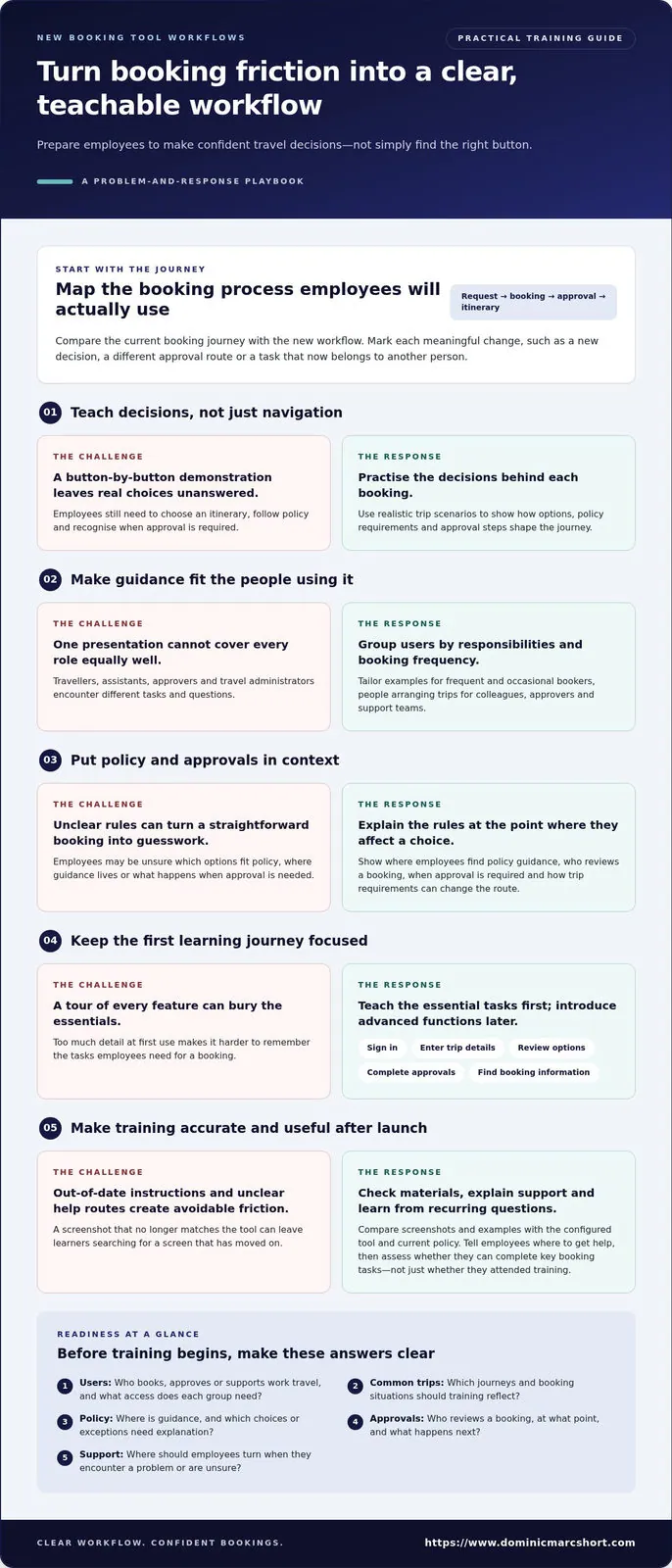
Next, separate essential first-use tasks from features employees may need only occasionally. Focus initial training on signing in, entering trip details, reviewing options, completing required approvals and finding booking information. Introduce advanced functions later, when they are relevant. A focused first journey is easier to remember than a tour of every button.
Why one demonstration rarely serves every traveller
Different roles call for different guidance. Frequent travellers may benefit from practising less routine decisions, while occasional bookers often need a simple reference they can revisit. Approvers need to understand what they are reviewing and how to respond. Support teams need to know the intended process so they can help resolve common snags.
Confidence matters, too. Some employees will explore the workflow readily; others will prefer clear instructions and time to practise. Tailor examples and support to each group’s responsibilities rather than expecting one presentation to meet every need. Nobody needs to become a software wizard overnight. The aim is steady confidence with the tasks each person actually performs.
Prepare the organisation and booking workflow before employee training begins
Useful training starts before anyone opens a presentation. First, make sure the process employees are being taught matches the one they will actually use. Map the current booking journey against the new workflow, from the initial travel request through booking and approval to access to the itinerary. Mark each meaningful change, such as a new decision, a different approval route or a task that now belongs to another person.
A structured travel management system audit checklist can help reveal gaps between the intended process and the configured tool. Use the findings to build a practical readiness list:
- Users: Who books, approves or supports work travel, and what access does each group need?
- Common trips: Which journeys and booking situations should training reflect?
- Policy: Where can employees find relevant guidance, and which choices or exceptions need explanation?
- Approvals: Who reviews a booking, at what point, and what happens when approval is needed?
- Support: Where should employees turn if they encounter a problem or are unsure what to do?
Map employee groups, booking tasks and likely questions
Group users by booking frequency, responsibilities and access needs, rather than treating the organisation as one very large, very similar group of travellers. Frequent bookers, occasional travellers, people arranging trips for colleagues, approvers and travel administrators may all encounter different steps. Anticipate their questions: travellers may ask how to compare suitable options, while approvers may need clarity on what they are being asked to review.
Check whether the process changes by trip type or approval requirement. A straightforward booking and a trip requiring additional authorisation may need different instructions. Make those distinctions visible in both the workflow and the training plan, rather than leaving employees to discover them by trial and error.
Build accurate materials around real booking scenarios
Use representative scenarios to guide employees through searching, comparing options and completing a booking. Show where policy guidance appears in the journey and explain how to follow the relevant approval steps. If different trip requirements call for different routes, make the distinction clear without burying learners in every possible exception.
Before training employees on new booking tool processes, compare every screenshot, instruction and example with the configured tool and current policy. An outdated image can send learners on a small but memorable treasure hunt. Assign someone to review materials whenever the workflow changes, so employees are not taught yesterday’s process for tomorrow’s booking.
When preparation involves aligning people, processes and travel technology, business travel transformation consulting can support a considered change-management approach.
Use this checklist to train employees on the new booking tool
A practical training sequence gives employees a clear starting point, time to try the workflow and support they can return to later. Use this checklist to keep sessions focused on real tasks rather than turning them into a tour of every feature.
- 1. Explain the purpose. Describe what the tool is intended to help employees do and how it fits the organisation’s booking process. Set out what learners should be able to complete by the end of the session.
- 2. Show a realistic booking journey. Demonstrate a relevant trip from search to booking. Explain the decisions as well as the screen actions, including when policy guidance and approval steps apply.
- 3. Tailor the session to each role. Focus on the tasks learners perform. Travellers can practise making a booking, approvers can review a request, and support teams can learn how to guide colleagues through common steps.
- 4. Let employees practise. Give learners a relevant scenario and time to complete it themselves. Invite questions as they go and explain where the process differs, rather than simply repeating the demonstration.
- 5. Share useful reference materials. Provide concise job aids, a recorded walkthrough or a searchable question-and-answer resource. Make each resource easy to revisit at the point of need.
- 6. Explain how to get help. Make the support route clear for employees who get stuck during a real booking. After the session, collect questions that reveal where the instructions or workflow need clarification.
Deliver role-based, practical training rather than a feature tour
Begin with the employee’s task, not the software menu. A short demonstration can show how to search and compare options, but useful instruction also explains what to consider and what happens next. Follow the demonstration with guided practice based on the learner’s role and typical trip patterns. This helps employees connect the tool with the booking decision and the organisation’s process.
Keep sessions manageable. Employees need room to try, pause and ask questions; nobody benefits from a software endurance test. A calm pace helps learners focus on what they need now, while occasional features can be covered in reference materials or later briefings.
Make learning accessible before and after the session
Training does not end when the meeting does. Give employees clear, reusable materials and a defined route to help, then use their questions to improve the guidance. Consistent communication about travel programme updates reinforces what has changed and where to find current instructions.
For travel leads, this sequence makes training employees on new booking tool processes easier to plan and deliver. When a rollout also requires alignment across people, processes and technology, business travel transformation consulting can form part of the change-management approach.
Support adoption after launch and measure whether employees can use the tool
Launch is the start of adoption, not the finishing line. Attendance records show who joined a session, and completion records show who finished a learning activity. Neither proves that someone can complete a booking confidently, follow the intended workflow or recognise when approval is needed. When training employees on new booking tool workflows, assess what people can do as well as what they have attended.
Use practical signals already available to identify where employees need help. Review recurring questions, support requests and points where bookings stall or need correction. If the tool provides relevant data, look for patterns in how employees move through the booking process. Consider those signals alongside feedback: a repeated query might point to a training gap, unclear policy guidance or a process that needs attention.
Choose useful adoption signals without inventing targets
Start with evidence, not an arbitrary success percentage. Establish a baseline using reliable information, then decide which measures are useful for your organisation. Check whether employees can complete common booking tasks and follow the intended workflow and policy guidance. If available data cannot explain why a booking took a particular route, do not treat it as the whole picture. Pair system information with questions from travellers, approvers and support colleagues.
- Recurring questions: Which booking steps or policy points keep causing uncertainty?
- Support themes: Are employees asking for help with access, approvals or completing a booking?
- Process friction: Where do bookings pause, go off course or need someone to step in?
- Task confidence: Can employees explain and complete the steps relevant to their role?
Create a feedback loop that keeps guidance current
Assign clear ownership for reviewing questions and updating job aids. Internal champions or knowledgeable colleagues can be approachable first points of guidance, while sharing recurring issues with the person responsible for the process. Include approvers and travel support teams in the review; they often see difficulties that an attendance report will miss.
Turn feedback into a simple cycle: gather questions, identify the underlying issue, update instructions or process guidance, then tell employees what changed and why. Plain-language updates help stop a revised workflow turning into a game of “I heard it works differently now”. Clear travel programme stakeholder management can also keep affected groups aligned as improvements are introduced.
Use this evidence to refine employee support and the wider change approach. Set measures that reflect your booking process, then revisit them as the workflow and guidance develop.
Make the booking-tool rollout a managed change, not a one-off training event
A successful rollout brings preparation, practical instruction, ongoing support and review together. Training employees on new booking tool processes is one part of that change, not a single event to tick off. Once people start using the tool, their questions and experience can show whether the workflow, communications and guidance are working as intended.
Match the response to the scale of the change. A small adjustment, such as a revised step in a familiar booking journey, may need a concise briefing and an updated reference guide. A broader change affecting approval routes, responsibilities or several employee groups calls for more structured communications, role-specific guidance and follow-up. More messages are not automatically better; give each group the information it needs, when it needs it.
Coordinate training with travel programme communications
Employees should receive a consistent explanation of why the change is happening, what they need to do differently and where they can find help. Align messages from managers, travel administrators and training materials so one channel does not say “follow the new approval route” while another quietly points to the old one. A clear change management communication strategy connects those messages to the wider travel programme.
Plan communications around the employee journey. Introduce the change, explain the practical steps, provide guidance for first use and share updates as the process develops. Keep the language direct and useful. Employees do not need a grand announcement for every minor adjustment, but they do need to know which instructions are current.
Know when additional change support can help
More structured support is valuable when a rollout changes processes, roles and employee expectations at the same time. Start with process analysis to understand how work is done now and where responsibilities may shift. Then align the new workflow with the technology and prepare communications that address different groups’ concerns. This keeps the rollout grounded in how employees actually arrange and approve business travel.
For a straightforward update, a short briefing and refreshed guidance may be enough. For a wider transformation, a coordinated approach to process design, digital change and employee communication can maintain clarity from planning through adoption. The aim is not to make every change elaborate. It is to give people the right level of support, without leaving them to decipher the new process unaided.
Dominic Marc Short - Independent Consultant supports organisations with business travel and transformation consulting, including process analysis, optimisation, digital transformation and change communications. Dominic Marc Short - Independent Consultant brings more than 30 years of experience in business travel management, meetings and events, and marketing.
Build confident booking habits that last
Successful adoption takes more than showing employees where to click. Prepare the workflow and guidance before training, then give people practical opportunities to learn the decisions and steps relevant to their roles. After launch, use employee questions and process feedback to improve support and keep instructions current.
A clear plan for training employees on new booking tool workflows brings these elements together as a managed change, not a launch-day event. Match communication to the scale of the rollout, keep managers and travel teams aligned, and focus on whether employees can complete their booking tasks confidently and consistently.
For complex changes, process analysis, optimisation, digital transformation and tailored communications can help align people, processes and technology. Dominic Short brings more than 30 years of experience across business travel management, meetings and events, and marketing.
With thoughtful preparation and steady follow-up, a new booking workflow can become a clear, confident part of how your organisation travels for work.
Frequently Asked Questions
How do you train employees to use a new booking tool?
Train employees with a clear explanation, a realistic demonstration and time to practise relevant tasks. Show how to complete a booking, where policy guidance applies and what to do when approval is required. Tailor examples to employees’ roles, then provide concise reference materials and a clear route to help. Training employees on new booking tool workflows should prepare people to make decisions, not just recognise buttons.
What should employee training for a new travel booking tool include?
Include the tasks employees need to complete, the travel policy guidance that informs their choices and the approval steps they may encounter. Explain how to find booking details and where to get help if something is unclear. Keep essential first-use instructions separate from features employees may need only occasionally. This gives learners a practical foundation without asking them to memorise every function before arranging a trip.
How can you encourage employees to use a new booking tool?
Make the new process clear, relevant and straightforward to follow. Explain why the organisation is changing tools, what employees should do differently and how the workflow supports the travel programme. Give people a chance to practise and address friction promptly, especially when a familiar workaround seems easier. Managers and knowledgeable colleagues can reinforce the intended process with consistent guidance and direct questions to the right support route.
Should training be delivered in person or online?
Choose the format that best fits employees’ roles, locations and learning needs. An online demonstration lets people revisit steps at a convenient time, while a facilitated session gives learners space to ask questions and practise with guidance. A blended approach can combine both: introduce the workflow online, then provide role-based practice and reusable resources. Whichever format you choose, make sure learners can apply the process, not just watch it.
How do you measure whether booking-tool training has worked?
Assess whether employees can complete common booking tasks and follow the intended workflow, rather than relying only on attendance or course completion. Review recurring questions, support requests and points where bookings stall or need correction. Gather feedback from travellers, approvers and travel administrators to understand what the data may not explain. Establish a baseline using reliable information before setting targets, then refine measures as the process develops.
What should happen after employees complete booking-tool training?
Keep support available through clear reference materials, an understood route for questions and colleagues who can provide practical guidance. Review questions and support themes to identify unclear instructions or steps that create friction. Assign someone to update job aids when the workflow or policy guidance changes, then tell employees what has changed. Follow-up helps turn initial learning into confident use, rather than leaving training notes to gather digital dust.
How can you reduce employee resistance to a new booking tool?
Address concerns openly and explain what is changing, why it matters and how employees will be supported. Involve people who book, approve or support travel when identifying likely difficulties, and use their feedback to improve the process and training. Practical examples can show how the new workflow handles familiar tasks. Avoid treating reluctance as unwillingness: uncertainty, unclear instructions or extra steps may be the real issue, and each calls for a useful response.
Related articles

16 October 2026 · 14 min read
How to Choose a Keynote Speaker for an Event: A Practical Checklist
Discover how to choose a keynote speaker for an event with our handy checklist. Skip the guesswork and book a delightfully brilliant guest speaker today!

5 October 2026 · 13 min read
Communicating Travel Programme Updates to Employees: A Practical Guide
Master communicating travel program updates to employees! Keep staff smiling and journeys smooth with our delightful guide to clear, timely policy rollouts.

1 October 2026 · 13 min read
Hybrid Meeting Best Practices 2026: A Practical Checklist
Discover top hybrid meeting best practices 2026! Ensure remote and in-room colleagues shine together with our delightfully practical business checklist.